
Hardware tools
Faultier Documentation
Performing voltage fault-injection attacks
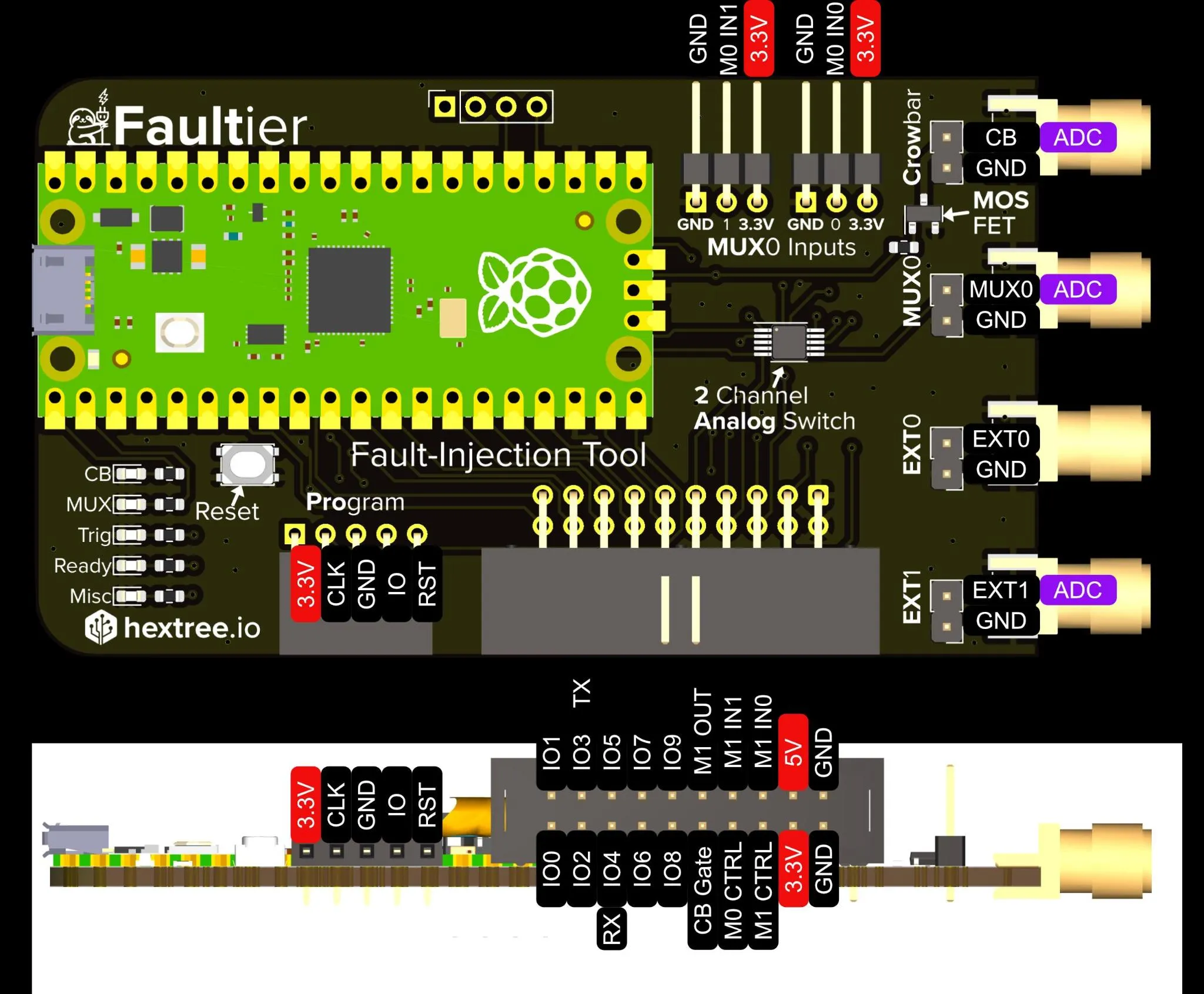
For the hardware overview and buying options, see the Faultier product page.
Reference for the faultier Python library.
Installing
pip3 install -U faultier
For debugger support also install:
pip3 install -U pyocd-faultier
Connecting
import faultier
ft = faultier.Faultier()
Important:
- Linux needs a udev rule, otherwise you get “Access denied”:
followed bySUBSYSTEM=="usb", ATTR{idVendor}=="37de", ATTR{idProduct}=="fffd", MODE="0666", GROUP="plugdev"sudo udevadm control --reloadand a re-plug.
Serial port
The Faultier also exposes a USB-serial bridge to the target:
import serial
s = serial.Serial(ft.get_serial_path(), 115200)
get_serial_path() resolves the correct device path per platform (COM port on Windows,
/dev/cu.* on macOS, a by-id path on Linux).
Glitcher
Configuration is local, not immediate
configure_glitcher() only mutates a local configuration object. Nothing is sent to the
device and no IO changes until you call glitch() or power_cycle(). Any parameter you
leave out keeps its previous value, so you can configure incrementally:
ft.configure_glitcher(
    trigger_type=faultier.TRIGGER_RISING_EDGE,
    trigger_source=faultier.TRIGGER_IN_EXT0,
    trigger_pull_configuration=faultier.TRIGGER_PULL_NONE,
    glitch_output=faultier.OUT_CROWBAR,
    power_cycle_output=faultier.OUT_MUX0,
    power_cycle_length=1_000_000,
)

# Later, only change one field:
ft.configure_glitcher(pulse=12)
To wipe the configuration back to “no trigger, no outputs, no pulls, delay/pulse 0”:
ft.default_settings()
This is also run automatically when the Faultier object is created.
Executing a glitch
ft.glitch(delay=5, pulse=1)
The sequence is: power-cycle (if configured) → wait for trigger (if configured) → wait
delay cycles → drive the glitch output for pulse cycles.
delay and pulse are in CPU cycles at 250 MHz, i.e. 4 ns per cycle.
If the trigger never fires, the device returns a trigger-timeout, which the library raises
as a ValueError("Trigger timeout!").
Power-cycle only, without glitching:
ft.power_cycle()
Internally this runs the same pipeline with trigger, delay, pulse and glitch output
disabled — which means a plain power_cycle() still fills the ADC buffer.
Trigger types
Set trigger_type to TRIGGER_NONE to glitch immediately (e.g. a fixed delay after a
power cycle) — there is no need to also clear trigger_source.
| Trigger type | Description |
|---|---|
TRIGGER_NONE | No trigger — wait delay cycles and glitch |
TRIGGER_HIGH | Fires as soon as the line is high (fires immediately if already high) |
TRIGGER_LOW | Fires as soon as the line is low (fires immediately if already low) |
TRIGGER_RISING_EDGE | Rising edge (0 → 1) |
TRIGGER_FALLING_EDGE | Falling edge (1 → 0) |
TRIGGER_PULSE_POSITIVE | Positive pulse (0 → 1 → 0) |
TRIGGER_PULSE_NEGATIVE | Negative pulse (1 → 0 → 1) |
Trigger sources
| Trigger source | Description |
|---|---|
TRIGGER_IN_NONE | Ignored — use TRIGGER_NONE to disable |
TRIGGER_IN_EXT0 | Use EXT0 as digital trigger input |
TRIGGER_IN_EXT1 | Use EXT1 as digital trigger input |
Pull-ups and pull-downs
trigger_pull_configuration enables the microcontroller’s internal weak resistor on
the trigger pin:
| Value | Effect |
|---|---|
TRIGGER_PULL_NONE | Pulls disabled — pin floats when undriven (default) |
TRIGGER_PULL_UP | Weak pull-up: undriven pin reads high |
TRIGGER_PULL_DOWN | Weak pull-down: undriven pin reads low |
The pull is applied to the pin selected by trigger_source
(EXT0 or EXT1) and only when a trigger is configured — with TRIGGER_NONE the pull
setting is never applied. It is (re-)applied every time a glitch runs, since that is when
the configuration is pushed to the device. The resistor is weak (tens of kΩ), so it only
defines the level of an undriven line; anything actively driving the pin wins easily.
Glitch and power-cycle outputs
The same enum is used for glitch_output and power_cycle_output.
| Output | Description |
|---|---|
OUT_CROWBAR | Drives the gate of the N-channel crowbar MOSFET (the usual glitch output) |
OUT_MUX0 | Analogue switch channel 0/X — the one on the SMA connector |
OUT_MUX1 | Analogue switch channel 1/Y — on the 20-pin header |
OUT_EXT0 | 3.3 V pulse on EXT0 — useful to trigger a ChipSHOUTER, laser, scope, … |
OUT_EXT1 | 3.3 V pulse on EXT1 — same |
OUT_NONE | Disabled. Trigger, delay, power-cycle and ADC still run — ideal for testing |
The MUX outputs switch the analogue switch from IN0 (idle) to IN1 (glitch/power-cycle active), which is how a target’s supply is cut and restored.
Non-blocking glitching
glitch() blocks until the glitch completes. When the trigger is generated by your own
Python code (starting a debug transaction, sending a UART byte, …) you need to arm first
and act afterwards:
ft.glitch_non_blocking(delay, pulse)

# ... do the thing that causes the trigger ...

# MANDATORY: read the response, otherwise the protocol desyncs.
ft.glitch_check_non_blocking_response()
The check call is where trigger-timeout and error exceptions surface.
ADC
The ADC is clocked from the CPU clock and takes 96 cycles per sample — about 2.6 MS/s
at 250 MHz. clock_division divides that further:
sample rate = 250_000_000 / (96 * clock_division)
ft.configure_adc(faultier.ADC_CROWBAR, 3000)            # ~2.6 MS/s
ft.configure_adc(faultier.ADC_CROWBAR, 3000, 10)        # ~260 kS/s, 10x longer window
| ADC source | Description |
|---|---|
ADC_CROWBAR | Drain side of the crowbar MOSFET |
ADC_MUX0 | Output of multiplexer channel 0 |
ADC_EXT1 | Whatever is attached to EXT1 |
Capture starts when the trigger fires (or immediately with TRIGGER_NONE) and the buffer
is refilled on every glitch() and every power_cycle().
To capture without glitching, disable the glitch output:
ft.configure_glitcher(
    trigger_type=faultier.TRIGGER_NONE,
    glitch_output=faultier.OUT_NONE,
    power_cycle_output=faultier.OUT_NONE,
)
ft.glitch(delay=0, pulse=0)

values = ft.read_adc()   # list of floats, 0.0 – 1.0 (8-bit samples / 255)
SWD checker
The Faultier runs a full SWD stack on-device, which makes “is the target still locked?” checks fast enough to run inside a glitch loop — no OpenOCD round-trip.
ft.swd_check()      # True if an SWD device responds (e.g. STM32 RDP2 → RDP1 glitch)
ft.nrf52_check()    # True if nRF52 APPROTECT is disabled / flash is readable
nrf52_check() & swd_check() return False rather than raising when the debug transaction fails, so it is safe to call after a glitch that crashed the target.
Debugger support
The Faultier can be used as an SWD debugger using PyOCD. Install the faultier-compatible version using pip3 install -U pyocd-faultier.
To connect to a target you can run:
pyocd commander -t <Target>
For example for an STM32F205:
pyocd commander -t stm32f205rgtx
Helpers
RandomOrderGenerator
Walks a range in a shuffled but exhaustive order (no repeats, no buffering of the whole range). Useful for sweeping delays so partial runs still cover the whole space evenly:
from faultier import RandomOrderGenerator

gen = RandomOrderGenerator(1000, 2000)
delay = gen.next_value()   # raises StopIteration once every value has been visited
gen.reset()
Quick reference
| Call | Purpose |
|---|---|
Faultier() | Connect, handshake, reset to defaults |
default_settings() | Reset glitcher configuration |
configure_glitcher(...) | Set trigger/outputs/delay/pulse (local only) |
configure_adc(source, count, div=1) | Configure the ADC capture |
glitch(delay, pulse) | Run the full pipeline, blocking |
glitch_non_blocking(delay, pulse) | Arm without blocking |
glitch_check_non_blocking_response() | Mandatory completion read for the above |
power_cycle() | Power-cycle only (still fills the ADC) |
read_adc() | Fetch the sample buffer as floats 0.0–1.0 |
swd_check() / nrf52_check() | Fast on-device lock checks |
get_serial_path() | Path to the USB-serial bridge |